Introducing @SteelSeries Rivality: Tactile Alerts for Desktop and Hyperlink Detection for Browser with #Haptic tech
http://www.ifeelpixel.com/download/whatsnew.htm …
Monday, June 05, 2017

Friday, November 18, 2011
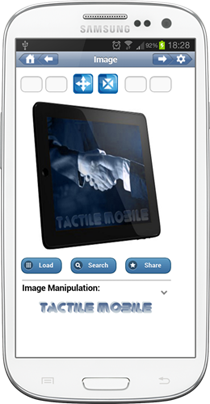
Tactile Mobile: Haptic Application for Android Platform

Tactile Mobile allows to make accessible and interactive picture elements.
Main benefits:
. Feel and Touch your personal pictures
. Adds instantly tactile effects to any image
. Simulate tactile sensations related to the textures or relief of the 2D images displayed on your screen
. Revolutionary technology adds the sense of touch to your smartphone experience
. Pixel detection, carried out in real time, is announced by haptic effects
. Multimodal user interface: Haptic Feedback and Audio Feedback enable user-system interactions
Tactile Mobile makes palpable pixels on the fly, you can surf all the web haptically and auditorally. You won't believe your fingers and ears!

Saturday, January 29, 2011
Stable version of iFeelPixel software
Hello friends,
A new version of iFeelPixel is available online. This is the most stable version ever released. We recommend to update your version of the software to improve stability.
Change list:
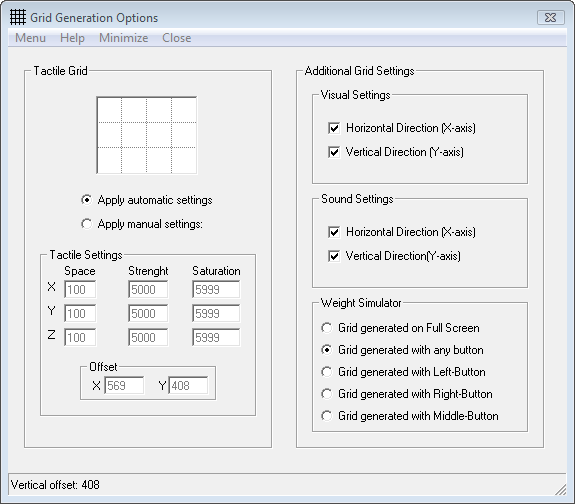
- Grid Options: weight simulator allows to simulate the weight of an object (icons, windows) if any button is pressed

- The default force settings have been modified. We recommend to reset settings to default if you installed a previous version on your machine.
- By default, sliders are set to the value 5, so users have equal range for decreasing and increasing forces.
- Grab the status bar with left-button to move the window (This is useful if your cursor become frozen when you click the title bar to move the window)
- TouchSense Plugin stability improved for TouchSense devices
- Stability and bug fixes
- The software automatically detects if the Falcon is calibrated
- Novint Falcon Settings: if position Z is disabled, the zoom is not controled by Z-axis
- "Swap buttons" added in "Force Settings" (Swap between left-button and right-button)
- Morse is not working correctly if another feature is activated (fixed issue)
- Error message on Exit, because library and process are not correctly unloaded and terminated (fixed issue)
Best regards,
iFeelPixel association
Interactive Accessibility via Sense of Touch
https://www.ifeelpixel.com/
A new version of iFeelPixel is available online. This is the most stable version ever released. We recommend to update your version of the software to improve stability.
Change list:
- Grid Options: weight simulator allows to simulate the weight of an object (icons, windows) if any button is pressed
- The default force settings have been modified. We recommend to reset settings to default if you installed a previous version on your machine.
- By default, sliders are set to the value 5, so users have equal range for decreasing and increasing forces.
- Grab the status bar with left-button to move the window (This is useful if your cursor become frozen when you click the title bar to move the window)
- TouchSense Plugin stability improved for TouchSense devices
- Stability and bug fixes
- The software automatically detects if the Falcon is calibrated
- Novint Falcon Settings: if position Z is disabled, the zoom is not controled by Z-axis
- "Swap buttons" added in "Force Settings" (Swap between left-button and right-button)
- Morse is not working correctly if another feature is activated (fixed issue)
- Error message on Exit, because library and process are not correctly unloaded and terminated (fixed issue)
Best regards,
iFeelPixel association
Interactive Accessibility via Sense of Touch
https://www.ifeelpixel.com/
Friday, October 22, 2010
iFeelPixel new version with advanced feature
Hello all,
We are happy to announce that a new version (1.4.1) of iFeelPixel is available online with new features:
- Advanced Texture Generation Algorythm improved. Tactile Sensations are enhanced.

- We added 2 new type of sliders in the "Speed and force settings windows". These sliders allow to generate advanced textures sensations: Positive (Right or down directions) and Negative (Left or Up directions)

To unlock the Advanced Texture feature, the Professional edition of iFeelPixel TactileWare is required.
- New setup executable automatically disables desktop composition and run as Admin.
We are planning to develop new services and new features for special uses (multi-device capability).
Please let us know if you would like see another feature in the next version.
Thanks for your support and (haptic) feedback .
Best regards,
iFeelPixel association
We are happy to announce that a new version (1.4.1) of iFeelPixel is available online with new features:
- Advanced Texture Generation Algorythm improved. Tactile Sensations are enhanced.
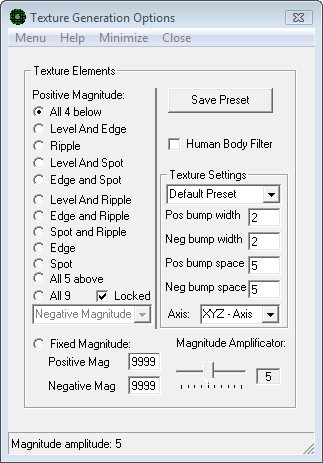
- We added 2 new type of sliders in the "Speed and force settings windows". These sliders allow to generate advanced textures sensations: Positive (Right or down directions) and Negative (Left or Up directions)
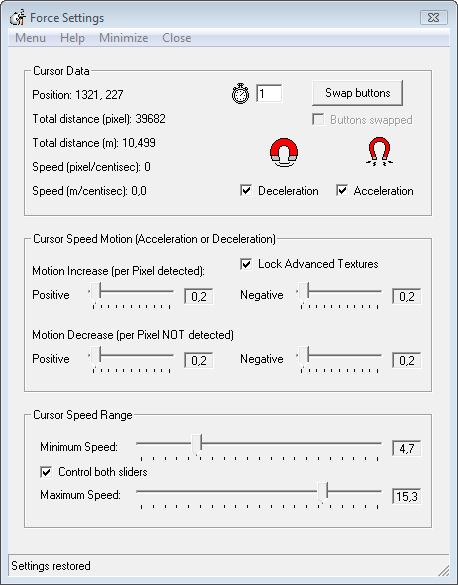
To unlock the Advanced Texture feature, the Professional edition of iFeelPixel TactileWare is required.
- New setup executable automatically disables desktop composition and run as Admin.
We are planning to develop new services and new features for special uses (multi-device capability).
Please let us know if you would like see another feature in the next version.
Thanks for your support and (haptic) feedback .
Best regards,
iFeelPixel association
Monday, July 12, 2010
iFeelPixel Interface updated
Greetings iFeelPixel user!
We are glad to announce you that a new version of iFeelPixel TactileWare (v.1.3.3) is released online.
If your version is outdated, please update to the most current version.
Forgot your license key? Please go to our unlock key reminder
Are you a new user? Please register.
List of changes:
- Fully compatible with windows XP, Vista, Seven operating system
- Cursor Behavior added (User can determine the cursor speed) (v.1.3.3)
https://www.ifeelpixel.com/support/cursorbehavior.htm
- "Speed and force settings" window updated (v.1.3.3)
https://www.ifeelpixel.com/pictures/beta10/Speed_and_force_settings.png
- Color Detection: User can select between 4 methods of color generation (Intensity, Hue, Saturation, Luminance).
- Advanced Color Selector added
- The following features: Edge detection, Color detector, Tactile Grid, Texture generation and TONAR (windows attraction) have been updated and improved. The new tactile grid can be useful if others features cannot detect any pixel of interest (For example: overlay video).
- "Novint Falcon Settings" window updated (v.1.3.3)
https://www.ifeelpixel.com/screenshots/novint/novint_falcon_options.html
You can disable or enable gravity compensation directly from Novint Falcon Options.
This version is fixing some issues between the cursor accuracy and Z-axis. Thus, Tactile sensations have been improved.
- Use Novint Falcon 'Top Button' to:
+ Switch between Attraction, Normal, Repulsion (Primary effects).
+ Disable\Enable Mouse control
+ Switch between Mass, Damper, Spring and Acceleration (Secondary effects)
+ Show Shortcut Menu
- Possibility to disable/enable every axis (every axis can have his own Mass/Force).
- New Automatic Force Feedback Checkbox:
Checked = the Force is automatically generated by the velocity or acceleration (Recommended).
Unchecked = Manual Force.
Selection choices: mass, mass-damper, spring-mass-damper or mass-acceleration.
- Stability and bug fixes (v.1.3.3)
- Memory Usage Reduced (v.1.3.3)
A full list of changes in this version can be found at:
https://www.ifeelpixel.com/download/whatsnew10.htm
Please try this new version and let us know your point of view here:
https://www.ifeelpixel.com/support/test.php
Thanks again for your interest about our haptic technology.
Best regards,
iFeelPixel association
https://www.ifeelpixel.com
We are glad to announce you that a new version of iFeelPixel TactileWare (v.1.3.3) is released online.
If your version is outdated, please update to the most current version.
Forgot your license key? Please go to our unlock key reminder
Are you a new user? Please register.
List of changes:
- Fully compatible with windows XP, Vista, Seven operating system
- Cursor Behavior added (User can determine the cursor speed) (v.1.3.3)
https://www.ifeelpixel.com/support/cursorbehavior.htm
- "Speed and force settings" window updated (v.1.3.3)
https://www.ifeelpixel.com/pictures/beta10/Speed_and_force_settings.png
- Color Detection: User can select between 4 methods of color generation (Intensity, Hue, Saturation, Luminance).
- Advanced Color Selector added
- The following features: Edge detection, Color detector, Tactile Grid, Texture generation and TONAR (windows attraction) have been updated and improved. The new tactile grid can be useful if others features cannot detect any pixel of interest (For example: overlay video).
- "Novint Falcon Settings" window updated (v.1.3.3)
https://www.ifeelpixel.com/screenshots/novint/novint_falcon_options.html
You can disable or enable gravity compensation directly from Novint Falcon Options.
This version is fixing some issues between the cursor accuracy and Z-axis. Thus, Tactile sensations have been improved.
- Use Novint Falcon 'Top Button' to:
+ Switch between Attraction, Normal, Repulsion (Primary effects).
+ Disable\Enable Mouse control
+ Switch between Mass, Damper, Spring and Acceleration (Secondary effects)
+ Show Shortcut Menu
- Possibility to disable/enable every axis (every axis can have his own Mass/Force).
- New Automatic Force Feedback Checkbox:
Checked = the Force is automatically generated by the velocity or acceleration (Recommended).
Unchecked = Manual Force.
Selection choices: mass, mass-damper, spring-mass-damper or mass-acceleration.
- Stability and bug fixes (v.1.3.3)
- Memory Usage Reduced (v.1.3.3)
A full list of changes in this version can be found at:
https://www.ifeelpixel.com/download/whatsnew10.htm
Please try this new version and let us know your point of view here:
https://www.ifeelpixel.com/support/test.php
Thanks again for your interest about our haptic technology.
Best regards,
iFeelPixel association
https://www.ifeelpixel.com
Monday, April 12, 2010
Wednesday, March 24, 2010
New version of iFeelPixel (Haptic interface)
Hello everyone,
This is to let you know a new version of iFeelPixel is available online. The new F-gen/NVeNt/HDAL Beta 2 is recommended and should be installed on your machine.
You can disable or enable gravity compensation directly from Novint Falcon Options.
This version is fixing some issues between the cursor accuracy and Z-axis. Thus, Tactile sensations have been improved. Please try this new version and let us know your opinion.
- The default force settings have been modified. We recommend to reset settings to default if you installed a previous version on your machine.
- Compatibility improved for windows 7 (Application virtualization made with Boxedapp packer, side-by-side feature)
- We added a new slider in the "Speed and force settings windows".
This slider allows the software to decrease (slowly or quickly) the force feedback when there is no pixel detected.
- The following features: Edge detection, color detection (color selector), tactile Grid, Texture generation and TONAR (windows attraction) have been updated and improved. We added the Z-axis in the Grid option and Texture option.
- The software can detect if the new Novint Driver is correctly installed on the machine. It runs even if latest HDAL files are not installed or missing.
- The user can choose between absolute grip position or relative grip position.
Thanks again to every users and Beta-testers that tried our software.
Best regards,
iFeelPixel association
Interactive Accessibility via Haptic Technology
This is to let you know a new version of iFeelPixel is available online. The new F-gen/NVeNt/HDAL Beta 2 is recommended and should be installed on your machine.
You can disable or enable gravity compensation directly from Novint Falcon Options.
This version is fixing some issues between the cursor accuracy and Z-axis. Thus, Tactile sensations have been improved. Please try this new version and let us know your opinion.
- The default force settings have been modified. We recommend to reset settings to default if you installed a previous version on your machine.
- Compatibility improved for windows 7 (Application virtualization made with Boxedapp packer, side-by-side feature)
- We added a new slider in the "Speed and force settings windows".
This slider allows the software to decrease (slowly or quickly) the force feedback when there is no pixel detected.
- The following features: Edge detection, color detection (color selector), tactile Grid, Texture generation and TONAR (windows attraction) have been updated and improved. We added the Z-axis in the Grid option and Texture option.
- The software can detect if the new Novint Driver is correctly installed on the machine. It runs even if latest HDAL files are not installed or missing.
- The user can choose between absolute grip position or relative grip position.
Thanks again to every users and Beta-testers that tried our software.
Best regards,
iFeelPixel association
Interactive Accessibility via Haptic Technology
Tuesday, September 08, 2009
Novint Falcon Promotion 20% off
Special offer: Use the referral code "ifeelpixel" to get 20% off a novint falcon pistol grip bundle!
The Novint Falcon is an entirely new type of game controller. Replacing your mouse or joystick, the Falcon is, essentially, a small robot that lets you experience true virtual touch unlike any controller in history.
The Novint Falcon lets you control a game in three dimensions, and also lets you feel high-fidelity three-dimensional force feedback. The Falcon controller moves right and left, forwards and backwards, like a mouse, but also moves up and down. When you hold the Falcon’s detachable Grip and move your cursor to interact with a virtual object, environment, or character, motors in the device turn on and are updated approximately 1000 times a second, letting you feel texture, shape, weight, dimension, and dynamics. The Falcon lets you control and interact with games in more realistic way, allowing you to develop real physical skill and muscle memory, adding a new dimension to gaming.
Hold the Falcon’s interchangeable Grip and feel a character’s actions, instead of controlling a game with mouse-clicks and meters. Feel the weight of a basketball as you shoot it towards a hoop, the momentum and impact as you swing a virtual golf club and strike a ball, the recoil of a weapon or the physical characteristics of virtual objects and environments.
iFeelPixel and Novint develop 3D haptic technology and products that enable people to experience a realistic sense of touch using their computer. Using our 3D haptic interface device, the Novint Falcon, and patented 3D haptic software, computer users may feel 3D objects, feel their shapes and textures, feel the dynamic properties of objects, and feel many other effects. The Novint Falcon gives force feedback through interchangeable handles that a user holds on to. Forces are created through the use of 3 electrical motors, 1 motor connected to each of the 3 arms in the device. The 3 arms connect to the device’s handle. The Novint Falcon is, essentially, a small robot, yet its industrial design is something that consumers will enjoy having on their desktop. Although it gives extremely complex 3D haptic interactions, it is beautiful in its fundamental simplicity and elegance.
Special offer: Use the referral code "ifeelpixel" to get 20% off a novint falcon pistol grip bundle!
Wednesday, July 22, 2009
Compatibility added for Tactile Mobile phone
Greetings TactileWare users!
This is to inform you that iFeelPixel beta 1.0.0 (Official version) is available at: https://www.ifeelpixel.com/download/
If your version is outdated, please update to the most current version.
A full list of changes in this version can be found at: https://www.ifeelpixel.com/download/whatsnew10.htm
What's new in this version?
1. New Features
1. Rumble Feedback (To enable Rumble effects for Nintendo Wiimote).
2. Vibro-Tactile Feedback (To enable Vibro-Tactile effects for Tactile Mobiles).
3. Tactile Feedback (To enable Tactile effects for TouchSense devices).
4. Force Feedback (To enable force effects for Novint Falcon).
The Novint Falcon is an entirely new type of game controller. Replacing your mouse or joystick, the Falcon is, essentially, a small robot that lets you experience true virtual touch unlike any controller in history.
III. Auditory Feedback is divided into 3 parts:
1. Sound Card Feedback
2. Internal Speakers
3. Narrator Voices
Multi-modal feedback including the sensation of touch proved to significantly increase speed and reduce error rates.
2. Updated Options
- Edge Detection: Automatic or Manual Periodic effect (v.1.0.0)
- Color Detection: Color Force (Novint Falcon) and Tactile Duration Slider added (v.1.0.0)
3. New Options
- Tactile Mobile Option (v.1.0.0)
4. Optimizations
- Visual Force Feedback (Pseudo-haptic developed in collaboration with INRIA) motion is much more precise than before (decimal precision). (v.1.0.0)
- Novint Falcon Algorithm optimized:
The force feedback is more consistent when "Mass" is selected. The others algorythms are based on the Grip speed value. If the speed is 0, there is no force feedback effect.
Automatic Force based on Mass Effect: mass is the quantity of inertia possessed by an object or the proportion between force and acceleration refered to in Newton's second law of Motion. Selection choices: mass, mass-damper, spring-mass-damper or mass-acceleration.The mass value is expressed in Kilogram (Default value is 2,5 Kilogram)
5. Others updates
- "Bug Report" updated for the Tactile Mobile (v.1.0.0)
- "Tactile Feedback" updated for Edge, line, corner, color detection (v.1.0.0)
- "Delete file settings" added (v.1.0.0)
- Visual Feedback renamed to "Visual Force Feedback" (v.1.0.0)
- "Clipboard viewer" moved to "clipboard window" (v.1.0.0)
- Volume Slider renamed to "Strength" slider (v.1.0.0)
6. Know issues
List of known issues in this version of iFeelPixel:
. Installation of Immersion VibeTonz Studio is required for tactile mobile users (we are working with Immersion Corporation to offer an alternative solution). (v.1.0.0)
See USB Advanced Network Functionality for Mobile Device Center/ActiveSync troobleshootings.
Note: Mobile Device Center (Vista) or ActiveSync (XP) should be already installed and configured on your machine.
--
Best Regards,
iFeelPixel Association
Interactive Accessibility via Haptic Technology
https://www.ifeelpixel.com/
This is to inform you that iFeelPixel beta 1.0.0 (Official version) is available at: https://www.ifeelpixel.com/download/
If your version is outdated, please update to the most current version.
A full list of changes in this version can be found at: https://www.ifeelpixel.com/download/whatsnew10.htm
What's new in this version?
1. New Features
- Tactile Mobile: Creates Tactile effects for your mobile phone with VibeTonz Technology. To date, more than 65 million handsets with Immersion's high-fidelity, programmable haptics technology have shipped around the world.
iFeelPixel software lets mobile phone users design their own haptic effects to personalize touch feedback. Touch feedback makes the mobile phone user experience more sensory, intuitive, useful, fun and allows users to feel a computer screen anywhere. (v.1.0.0).
From its "Tactile Mobile" option, iFeelPixel lets users create personalized haptic effects through a graphical user interface based on the conventions of Immersion's VibeTonz(R) Studio authoring tool for developers. Users can modify wave shape, duration, and intensity to create distinctive vibrational patterns. These creations let users personalize their phone with unique haptic experiences.
- New multimodal file menubar
I. Visual Force Feedback (To enable pseudo-haptic effects with a simple mouse)
II. Haptic feedback is divided into 4 parts:
1. Rumble Feedback (To enable Rumble effects for Nintendo Wiimote).
2. Vibro-Tactile Feedback (To enable Vibro-Tactile effects for Tactile Mobiles).
3. Tactile Feedback (To enable Tactile effects for TouchSense devices).
4. Force Feedback (To enable force effects for Novint Falcon).
The Novint Falcon is an entirely new type of game controller. Replacing your mouse or joystick, the Falcon is, essentially, a small robot that lets you experience true virtual touch unlike any controller in history.
III. Auditory Feedback is divided into 3 parts:
1. Sound Card Feedback
2. Internal Speakers
3. Narrator Voices
Multi-modal feedback including the sensation of touch proved to significantly increase speed and reduce error rates.
2. Updated Options
- Edge Detection: Automatic or Manual Periodic effect (v.1.0.0)
- Color Detection: Color Force (Novint Falcon) and Tactile Duration Slider added (v.1.0.0)
3. New Options
- Tactile Mobile Option (v.1.0.0)
4. Optimizations
- Visual Force Feedback (Pseudo-haptic developed in collaboration with INRIA) motion is much more precise than before (decimal precision). (v.1.0.0)
- Novint Falcon Algorithm optimized:
The force feedback is more consistent when "Mass" is selected. The others algorythms are based on the Grip speed value. If the speed is 0, there is no force feedback effect.
Automatic Force based on Mass Effect: mass is the quantity of inertia possessed by an object or the proportion between force and acceleration refered to in Newton's second law of Motion. Selection choices: mass, mass-damper, spring-mass-damper or mass-acceleration.The mass value is expressed in Kilogram (Default value is 2,5 Kilogram)
5. Others updates
- "Bug Report" updated for the Tactile Mobile (v.1.0.0)
- "Tactile Feedback" updated for Edge, line, corner, color detection (v.1.0.0)
- "Delete file settings" added (v.1.0.0)
- Visual Feedback renamed to "Visual Force Feedback" (v.1.0.0)
- "Clipboard viewer" moved to "clipboard window" (v.1.0.0)
- Volume Slider renamed to "Strength" slider (v.1.0.0)
6. Know issues
List of known issues in this version of iFeelPixel:
. Installation of Immersion VibeTonz Studio is required for tactile mobile users (we are working with Immersion Corporation to offer an alternative solution). (v.1.0.0)
See USB Advanced Network Functionality for Mobile Device Center/ActiveSync troobleshootings.
Note: Mobile Device Center (Vista) or ActiveSync (XP) should be already installed and configured on your machine.
--
Best Regards,
iFeelPixel Association
Interactive Accessibility via Haptic Technology
https://www.ifeelpixel.com/
Monday, November 17, 2008
iFeelPixel TactileWare is compatible with Novint Falcon
Greetings everyone!
This is to inform you that iFeelPixel beta 0.9.0 (Major version) is available at: https://www.ifeelpixel.com/download/
If your version is outdated, please update to the most current version.
Description: Features and Benefits
- iFeelPixel is an application designed to create force feedback sensations based on pictures elements (pixel) or device button presses.
- Simply leave it running in the background, and any image generated by your computer will be represented with a matching sensation on an Immersion TouchSense device or Novint Falcon.
- iFeelPixel works with all games, all applications, and any other Windows program that has image.
- It works in parallel with existing access technology regardless of disability.
- Automatic conversion of graphics to pseudo-haptics and haptics that will make even the pure graphics on the Internet accessible to low vision and blind users.
- It's the first multimodal software that allows a user to feel the pixels on the screen with haptic feedback, visual feedback and auditory feedback at a time.
- It engages your sense of touch for a more natural, intuitive experience. Feeling is believing!
Find more informations at: https://www.ifeelpixel.com/description/
What's new in this version?
-Visual Feedback (Pseudo-haptic developed in collaboration with INRIA) has been optimized. Users can select if they prefer to be attracted or repulsed when there is a pixel detection under their cursor.
That's mean iFeelPixel software can simulate realistic pseudo-tactile sensations without a haptic interface.
Have you ever dreamt of feeling the relief of images with a simple mouse? Now, it's possible!
- New multimodal file menubar
I. Visual Feedback (To enable pseudo-haptic effects with a simple mouse)
II. Haptic feedback is divided into 3 parts:
1. Rumble Feedback (To enable Rumble effects for Nintendo Wiimote).
2. Tactile Feedback (To enable Tactile effects for TouchSense devices).
3. Force Feedback (To enable force effects for Novint Falcon).
The Novint Falcon is an entirely new type of game controller. Replacing your mouse or joystick, the Falcon is, essentially, a small robot that lets you experience true virtual touch unlike any controller in history.
III. Auditory Feedback is divided into 3 parts:
1. Sound Card Feedback
2. Internal Speakers
3. Narrator Voices
Edge, Line, Corner, Color, Grid, Texture options has been updated (v.0.9.0):
- You can choose if you prefer an attraction effect or repulsion effect for Visual Feedback or Novint Falcon
A full list of changes in this version can be found at:
https://www.ifeelpixel.com/download/whatsnew9.htm
--
Best Regards,
iFeelPixel Association
Interactive Accessibility via Haptic Technology
https://www.ifeelpixel.com/
This is to inform you that iFeelPixel beta 0.9.0 (Major version) is available at: https://www.ifeelpixel.com/download/
If your version is outdated, please update to the most current version.
Description: Features and Benefits
- iFeelPixel is an application designed to create force feedback sensations based on pictures elements (pixel) or device button presses.
- Simply leave it running in the background, and any image generated by your computer will be represented with a matching sensation on an Immersion TouchSense device or Novint Falcon.
- iFeelPixel works with all games, all applications, and any other Windows program that has image.
- It works in parallel with existing access technology regardless of disability.
- Automatic conversion of graphics to pseudo-haptics and haptics that will make even the pure graphics on the Internet accessible to low vision and blind users.
- It's the first multimodal software that allows a user to feel the pixels on the screen with haptic feedback, visual feedback and auditory feedback at a time.
- It engages your sense of touch for a more natural, intuitive experience. Feeling is believing!
Find more informations at: https://www.ifeelpixel.com/description/
What's new in this version?
-Visual Feedback (Pseudo-haptic developed in collaboration with INRIA) has been optimized. Users can select if they prefer to be attracted or repulsed when there is a pixel detection under their cursor.
That's mean iFeelPixel software can simulate realistic pseudo-tactile sensations without a haptic interface.
Have you ever dreamt of feeling the relief of images with a simple mouse? Now, it's possible!
- New multimodal file menubar
I. Visual Feedback (To enable pseudo-haptic effects with a simple mouse)
II. Haptic feedback is divided into 3 parts:
1. Rumble Feedback (To enable Rumble effects for Nintendo Wiimote).
2. Tactile Feedback (To enable Tactile effects for TouchSense devices).
3. Force Feedback (To enable force effects for Novint Falcon).
The Novint Falcon is an entirely new type of game controller. Replacing your mouse or joystick, the Falcon is, essentially, a small robot that lets you experience true virtual touch unlike any controller in history.
III. Auditory Feedback is divided into 3 parts:
1. Sound Card Feedback
2. Internal Speakers
3. Narrator Voices
Edge, Line, Corner, Color, Grid, Texture options has been updated (v.0.9.0):
- You can choose if you prefer an attraction effect or repulsion effect for Visual Feedback or Novint Falcon
A full list of changes in this version can be found at:
https://www.ifeelpixel.com/download/whatsnew9.htm
--
Best Regards,
iFeelPixel Association
Interactive Accessibility via Haptic Technology
https://www.ifeelpixel.com/
Monday, August 11, 2008
Touching on every aspect of tactile graphics
Touching on every aspect of tactile graphics
Hosted by RNIB Centre for Accessible Information (incorporating the former National Centre for Tactile Diagrams)
The fourth international conference and exhibition on tactile diagrams, maps and pictures is a special event which brings together the world of design, production,procurement, use and support of tactile graphics (images which are touched rathert han looked at).
Conference website
Hosted by RNIB Centre for Accessible Information (incorporating the former National Centre for Tactile Diagrams)
The fourth international conference and exhibition on tactile diagrams, maps and pictures is a special event which brings together the world of design, production,procurement, use and support of tactile graphics (images which are touched rathert han looked at).
Conference website
Monday, June 02, 2008
WiiFeelPixel: Support for Nintendo Wii remote controller added
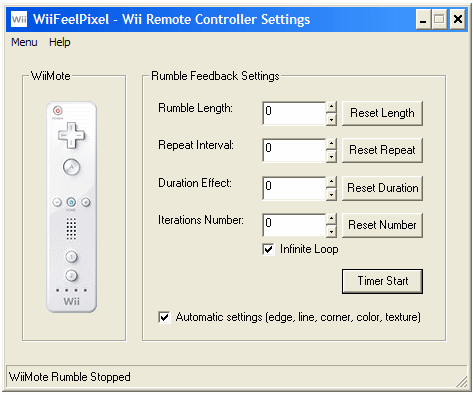 WiiFeelPixel: Rumble settings for the Nintendo Wii Remote Controller (v.0.8.4)
Hardware requirements: You need a WiiMote (a remote controller for the Nintendo Wii) to feel the Rumble Feedback and a compatible Bluetooth USB adapter to connect the computer with the WiiMote.
Thanks to Tokkyo Nakamura (Author of WiinRemote) for the help and Wiimote support (Copyright Nintendo Wii All rights reserved).
How to connect Wiimote with Bluesoleil?
Others updates:
- When you enable a feature on the toolbar, it automaticaly stops WiiMote Rumble (v.0.8.5)
- When you enable a feature on the toolbar, it automaticaly disables the others features not compatible (v.0.8.4)
- Mouse data and settings: new cursor speed value selected by default (v.0.8.4)
minimum speed = 5, maximum speed = 15, Maximum acceleration/deceleration per pixel = 2
- Content of clipboards window is erased before save/restore settings (v.0.8.5)
- Internet Time removed from Icon Systray, replaced by name of activated TouchSense Device (v.0.8.5)
- "Demo mode" button removed from "Limit mouse". "Disable Demo mode" shortcut removed (v.0.8.4)
- Clipboard monitored: if Edge or Texture feature are enabled when you copy a sound file, the sound file is automaticaly updated in Media Center (v.0.8.4)
- A tactile effect is played when a new clipboard is detected (v.0.8.4)
List of known issues in this version of iFeelPixel:
. The Wiimote rumble feedback is disabled, but when metronome feature is activated, a constant buzzz effect is started on the Wiimote (bug fixed v.0.8.5)
. TONAR volume strength is not correctly updated with volume slider (bug fixed v.0.8.5)
. iFeelPixel is stopped but when Line or Corner buttons are pressed, tactile effect is played if it is not the default effect (bug fixed v.0.8.5)
. Sometimes, "Zoom value" is not correctly updated with zoom slider value (bug fixed v.0.8.4)
. "Demo mode" is not correctly stopped, the mouse continue to moves alone (bug fixed v.0.8.4)
. "Volume Slider" value is not correctly updated when it is scrolled with wheel mouse (bug fixed v.0.8.4)
Friday, September 28, 2007
iFeelPixel compatible with Windows Vista
We are working on a new international version (O.8.2) of iFeelPixel software compatible with the new operating system from MicroSoft: Windows Vista. The release date is expecting before 1 January 2008.
Additional new features:
- Settings will be saved in a XML file. This way the software does not need to accesss the windows registry. Benefits: more safe, more secure, more stable for the computer and the user.
- Keyboard Piano: Hear musical sounds from your keystrokes. Transform your keyboard into a virtual Piano.
- Fix For Non English Users issue: International compatibility with international version of MicroSoft Windows
iFeelPixel Software for non-English users
ATTENTION non-English computer users...
If you are using a non-English computer system, iFeelPixel may experience errors due to incompatible localized language settings. This can cause Boolean values to be translated to a language other than English which prevents the application from working properly by creating invalid statements and registry settings.
To correct this problem, you must create one or more zero-length text file with the following file names (depending on the language your computer is using) and place it in the iFeelPixel application directory.
vb6FR.dll (French)
vb6DE.dll (German)
vb6IT.dll (Italy)
vb6JP.dll (Japan)
vb6KO.dll (Korean)
vb6ES.dll (Spain)
vb6CHS.dll (Chinese)
vb6CHT.dll (Chinese - Traditional)
AND, you must also create a zero-length text file with the following name and place it in the iFeelPixel application directory.
ifeelpixel.exe.local
These empty "dummy" files will prevent iFeelPixel from using the localized language settings and keep all activity in English. Note: theses files increase the CPU process of iFeelPixel executable and may slow down the iFeelPixel application. Use them with caution.
Download the international package for iFeelPixel
Additional new features:
- Settings will be saved in a XML file. This way the software does not need to accesss the windows registry. Benefits: more safe, more secure, more stable for the computer and the user.
- Keyboard Piano: Hear musical sounds from your keystrokes. Transform your keyboard into a virtual Piano.
- Fix For Non English Users issue: International compatibility with international version of MicroSoft Windows
iFeelPixel Software for non-English users
ATTENTION non-English computer users...
If you are using a non-English computer system, iFeelPixel may experience errors due to incompatible localized language settings. This can cause Boolean values to be translated to a language other than English which prevents the application from working properly by creating invalid statements and registry settings.
To correct this problem, you must create one or more zero-length text file with the following file names (depending on the language your computer is using) and place it in the iFeelPixel application directory.
vb6FR.dll (French)
vb6DE.dll (German)
vb6IT.dll (Italy)
vb6JP.dll (Japan)
vb6KO.dll (Korean)
vb6ES.dll (Spain)
vb6CHS.dll (Chinese)
vb6CHT.dll (Chinese - Traditional)
AND, you must also create a zero-length text file with the following name and place it in the iFeelPixel application directory.
ifeelpixel.exe.local
These empty "dummy" files will prevent iFeelPixel from using the localized language settings and keep all activity in English. Note: theses files increase the CPU process of iFeelPixel executable and may slow down the iFeelPixel application. Use them with caution.
Download the international package for iFeelPixel
https://www.ifeelpixel.com/download/international_package.zip
It may also be necessary to clean up any registry settings that were stored for iFeelPixel that might have been translated to a language other than English. To check your registry settings for iFeelPixel open the system registry using the Windows regedit.exe application and review the settings under the following key.
HKEY_LOCAL_MACHINE\Software\iFeelPixel
All entries under this key should be in English. For example, if any are French (Vrai or Faux) then they need to be changed to English (True or False).
It may also be necessary to clean up any registry settings that were stored for iFeelPixel that might have been translated to a language other than English. To check your registry settings for iFeelPixel open the system registry using the Windows regedit.exe application and review the settings under the following key.
HKEY_LOCAL_MACHINE\Software\iFeelPixel
All entries under this key should be in English. For example, if any are French (Vrai or Faux) then they need to be changed to English (True or False).
Tuesday, November 28, 2006
New web hosting
We are transfering the iFeelPixel website on Mavenhosting .
Our website is under maintenance. Thanks for your patience.
Our website is under maintenance. Thanks for your patience.
Tuesday, May 30, 2006
iFeelPixel TactileWare version 0.8.1 available
Greetings!
This is to inform you that iFeelPixel beta 0.8.1 (Stable minor version) is available at: https://www.ifeelpixel.com/download/
If your version is outdated, please update to the most current version.
Description: Features and Benefits
· iFeelPixel TactileWare makes accessible all the web content and graphical environment via the senses of vision, touch and hearing.
· It is a multimodal human-computer interface designed to create visio, audio and tactile sensations based on image or pictures elements (Pixel).
· It offers a multisensory immersion environment for any application (Text, Pictures, Flash movies, Games, 3D ...)
· iFeelPixel TactileWare, including vision, audition and touch, enables universal multi access on the Web; it works in parallel with existing access technology regardless of disability:
- Sighted people can use the visual feedback to visualize the data while blind and visually impaired people can use the sound or tactile feedback to extract informations.
- Automatic conversion of graphics to pseudo-haptics and haptics that will make even the pure graphics on the Internet accessible to low vision and blind users.
· iFeelPixel is a software that allows a user to feel the pixels on the screen with visual feedback, haptic feedback and aural feedback at a time.
It engages your sense of touch for a more natural, intuitive experience. Feeling is believing!
Find more informations at: https://www.ifeelpixel.com/description/
What's new in this version?
· Visual Feedback added (Pseudo-haptic developed in collaboration with INRIA):
Cursor speed and acceleration is automatically based on pixel brightness.
Alternatively, the cursor speed value can be modified manually by the user
(For Edge, Line, Corner, Color, Texture, Morse, Grid, TONAR features).
Note for Visual Grid and Visual TONAR: Digital zoom must be pressed to view visual effects.
Note for Morse: 'Read character' must be checked to view visual effects (Sign Language).
That's mean iFeelPixel software can simulate pseudo-tactile sensations without a haptic interface. Open File Menu > Visual Feedback (keyboard shortcut: Ctrl+ F1)
· Enable/Disable digital zoom when the user click the iFeelPixel logo on main window
Note: Digital Zoom cannot zoom itself to avoid weird graphical effects.
· Sound Feedback and Internal PC speakers updated: Sound Speed value is modified automatically if "visual feedback" is enabled (For Edge, Line, Corner, Color, Texture features)
· Mouse Data and Settings Window:
View Menu >> Mouse Data and Settings... (shortcut: Ctrl+W)
· Color detection improved, color options updated
· Line and corner options, status improved: Indicate color (Light / Dark), or orientation
· Line and corner effects are linked to threshold
https://www.ifeelpixel.com/support/threshold.htm
· "Constant force" (See edge options) interacts in correlation with "visual feedback" and "tactile feedback"
· "Hotsamp.ifr" file updated (Compatibility improved for TouchSense devices)
· You can send us your software code and set your license key directly from iFeelPixel software:
Help > About > Click 'Paypal Donate' button
Help > About > Paste your License Key in the Textbox > Click 'Set License' button
· Local search settings updated: now you can limit maximum size per file included in search
File > Local Search > Enter a Number in 'size per file' textbox (range: 1 KB to 99999 KB, Default = 5000 KB, No limit = 0)
· Privacy note: clipboards are automatically deleted at end of this session
File > Clipboards
· File > Media Center: 'Reset' and 'clear' buttons added for all features (Edge, Line, Corner, Grid, Color, Texture)
· 'Open all options' added in the Menu 'Options'
· Make a tactile grid automatically (Settings based on zoom size)
Make a tactile grid manually (Enter settings below)
Options > Tactile Grid
· Compact mode: Zoom view is automatically resized if the main window is resized.
View > Compact
· The single point of contact between cursor and screen is visually simulated by a red dot and a red circle on zoom view.
It symbolizes the only pixel of interest.
· Unchecking acceleration checkbox or deceleration checkbox reset cursor speed to 10, if cursor speed is actually decelerated or accelerated.
A full list of changes in this version can be found at:
https://www.ifeelpixel.com/download/whatsnew8.htm
--
Best Regards,
iFeelPixel Association
Interactive Accessibility via Tactile Sense Technology
https://www.ifeelpixel.com
This is to inform you that iFeelPixel beta 0.8.1 (Stable minor version) is available at: https://www.ifeelpixel.com/download/
If your version is outdated, please update to the most current version.
Description: Features and Benefits
· iFeelPixel TactileWare makes accessible all the web content and graphical environment via the senses of vision, touch and hearing.
· It is a multimodal human-computer interface designed to create visio, audio and tactile sensations based on image or pictures elements (Pixel).
· It offers a multisensory immersion environment for any application (Text, Pictures, Flash movies, Games, 3D ...)
· iFeelPixel TactileWare, including vision, audition and touch, enables universal multi access on the Web; it works in parallel with existing access technology regardless of disability:
- Sighted people can use the visual feedback to visualize the data while blind and visually impaired people can use the sound or tactile feedback to extract informations.
- Automatic conversion of graphics to pseudo-haptics and haptics that will make even the pure graphics on the Internet accessible to low vision and blind users.
· iFeelPixel is a software that allows a user to feel the pixels on the screen with visual feedback, haptic feedback and aural feedback at a time.
It engages your sense of touch for a more natural, intuitive experience. Feeling is believing!
Find more informations at: https://www.ifeelpixel.com/description/
What's new in this version?
· Visual Feedback added (Pseudo-haptic developed in collaboration with INRIA):
Cursor speed and acceleration is automatically based on pixel brightness.
Alternatively, the cursor speed value can be modified manually by the user
(For Edge, Line, Corner, Color, Texture, Morse, Grid, TONAR features).
Note for Visual Grid and Visual TONAR: Digital zoom must be pressed to view visual effects.
Note for Morse: 'Read character' must be checked to view visual effects (Sign Language).
That's mean iFeelPixel software can simulate pseudo-tactile sensations without a haptic interface. Open File Menu > Visual Feedback (keyboard shortcut: Ctrl+ F1)
· Enable/Disable digital zoom when the user click the iFeelPixel logo on main window
Note: Digital Zoom cannot zoom itself to avoid weird graphical effects.
· Sound Feedback and Internal PC speakers updated: Sound Speed value is modified automatically if "visual feedback" is enabled (For Edge, Line, Corner, Color, Texture features)
· Mouse Data and Settings Window:
View Menu >> Mouse Data and Settings... (shortcut: Ctrl+W)
· Color detection improved, color options updated
· Line and corner options, status improved: Indicate color (Light / Dark), or orientation
· Line and corner effects are linked to threshold
https://www.ifeelpixel.com/support/threshold.htm
· "Constant force" (See edge options) interacts in correlation with "visual feedback" and "tactile feedback"
· "Hotsamp.ifr" file updated (Compatibility improved for TouchSense devices)
· You can send us your software code and set your license key directly from iFeelPixel software:
Help > About > Click 'Paypal Donate' button
Help > About > Paste your License Key in the Textbox > Click 'Set License' button
· Local search settings updated: now you can limit maximum size per file included in search
File > Local Search > Enter a Number in 'size per file' textbox (range: 1 KB to 99999 KB, Default = 5000 KB, No limit = 0)
· Privacy note: clipboards are automatically deleted at end of this session
File > Clipboards
· File > Media Center: 'Reset' and 'clear' buttons added for all features (Edge, Line, Corner, Grid, Color, Texture)
· 'Open all options' added in the Menu 'Options'
· Make a tactile grid automatically (Settings based on zoom size)
Make a tactile grid manually (Enter settings below)
Options > Tactile Grid
· Compact mode: Zoom view is automatically resized if the main window is resized.
View > Compact
· The single point of contact between cursor and screen is visually simulated by a red dot and a red circle on zoom view.
It symbolizes the only pixel of interest.
· Unchecking acceleration checkbox or deceleration checkbox reset cursor speed to 10, if cursor speed is actually decelerated or accelerated.
A full list of changes in this version can be found at:
https://www.ifeelpixel.com/download/whatsnew8.htm
--
Best Regards,
iFeelPixel Association
Interactive Accessibility via Tactile Sense Technology
https://www.ifeelpixel.com
Monday, October 17, 2005
VIdeos about Tactile Images
2 new videos about tactile images have been posted on the iFeelPixel website:
iFeelPixel software can simulate pseudo-tactile sensations without a haptic interface.
Tactile Images: feeling the relief of images https://www.ifeelpixel.com/screenshots/
iFeelPixel beta 0.8: Cursor Speed Deceleration feature on a black/white chessboardThose videos explain and demonstrate the next cursor speed deceleration/acceleration features, developed in collaboration with INRIA.iFeelPixel software can simulate pseudo-tactile sensations without a haptic interface.
Monday, September 26, 2005
iFeelSmiley will be removed, but replaced by iFeelPixel chat
iFeelSmiley will be removed from iFeelPixel software (next version: 0.8), because Instant messengers (Yahoo, MSN, AOL, ICQ) are updated too often and too many changes occur to make a stable feature. But fortunately this old feature is replaced by iFeelPixel chat, provided by UserPlane.
iFeelPixel software will start more quickly, because Internet Explorer component is not anymore used to grab text and emoticons from Yahoo Messenger.
iFeelPixel software will start more quickly, because Internet Explorer component is not anymore used to grab text and emoticons from Yahoo Messenger.
Tuesday, July 26, 2005
Tactile Images: feeling the relief of images
Have you ever dreamt of feeling the relief of images with a simple mouse?
Now, it's possible!
By Dr. Anatole LECUYER
Research Scientist
INRIA - SIAMES Project
https://www.irisa.fr/siames/GENS/alecuyer/page1.html
Pseudo-Haptic Feedback project
https://www.irisa.fr/siames/GENS/alecuyer/projets_pseudo.html
This pseudo-haptic technology will be implemented into the core of iFeelPixel software to enable the universal triple-access by vision, audio and touch on the World Wide Web.
Best Regards,
iFeelPixel Association
Interactive Accessibility by TouchSense technology
https://www.ifeelpixel.com
Now, it's possible!
By Dr. Anatole LECUYER
Research Scientist
INRIA - SIAMES Project
https://www.irisa.fr/siames/GENS/alecuyer/page1.html
Pseudo-Haptic Feedback project
https://www.irisa.fr/siames/GENS/alecuyer/projets_pseudo.html
This pseudo-haptic technology will be implemented into the core of iFeelPixel software to enable the universal triple-access by vision, audio and touch on the World Wide Web.
Best Regards,
iFeelPixel Association
Interactive Accessibility by TouchSense technology
https://www.ifeelpixel.com
Tuesday, July 19, 2005
Feeling Bumps and Holes without a Haptic Interface
The Perception of Pseudo-Haptic Textures would be available soon.
A. Lécuyer, J.M. Burkhardt, L. Etienne, "Feeling Bumps and Holes without a Haptic Interface: the Perception of Pseudo-Haptic Textures", ACM Conference in Human Factors in Computing Systems (ACM SIGCHI'04), April 24-29, Vienna, Austria, 2004.
View abstract and introduction on iFeelPixel Forum:
https://www.ifeelpixel.com/forum/
Best Regards,
iFeelPixel Association
Interactive Accessibility by TouchSense technology
https://www.ifeelpixel.com
Thursday, June 09, 2005
EuroHaptics 2006
For your information:
EuroHaptics 2006 is to be held in Paris, France. It is being organised by Abderrahmane Kheddar. More information can be found on the EH 2006 webpage. Updates coming soon!
Best Regards,
iFeelPixel Association
Interactive Accessibility by TouchSense technology
https://www.ifeelpixel.com
Subscribe to:
Posts (Atom)


 Posts
Posts


